Showing posts with label Nezla Jans. Show all posts
Showing posts with label Nezla Jans. Show all posts
Thursday, December 13, 2012
Crit Reflection
Well, I think our critique went pretty well. Considering our thought process and the amount of time we had once we figured out what exactly we wanted to do, I think we made a pretty successful project. Alisyn and I really stepped out of our comfort zone to go into the wood shop and make a 5 ft box. I think everything up to the presentation was pretty solid. The presentation was were the project was lacking the most in my opinion and according to the critique, I think everyone else agreed. Nisa, Alisyn, and I went back and forth for at least two weeks on how we want to present this thing. We debated between having the demonstration, not having the demonstration, possibly have me do the painting live, having other people do the painting during critique. We made some wrong decisions but in another iteration I think we would get it much better. I really like the suggest of have a screen that would block the participant from the view of the audience and the audience would only see a silhouette of the person and hear the sounds they are making. I also really liked the suggestion of using a real laminated floor, which would be expensive, but maybe with a grant or something that could be possible. I think I want to work more on creating an environment/experience for my art pieces. I think that was what was really lacking in this piece and what would have sent it over the edge in a good way.

Wednesday, December 12, 2012




Monday, December 10, 2012
Concept Ideation
Here were some of our train of thoughts during the process of our piece:
performative lends itself to interactive
dance is a traditional old art, that we mixed with this new art.
active v passive
footsteps are leading with my example, not the music
you can never repeat the same steps twice or get the same tones
you always add you own spin on dance, dance is very fluid
reminiscent of art in general, adding their own thing to already done things. Especially in tech art, where your using open source things.
Reverses the dance process by having the "dance" come first instead of the music.Therefore the music becomes the art and defines art versus science cause art can never truly be replicated. Specifically, in technology art where artists are using open source codes
We found ourselves very interested in dance and this idea of creating music using computer, which start when we found the laser harp piece. What drew me into that piece was the fact that possibly one's whole body could make music if they wanted too. This possibility really got me excited.


Building the box
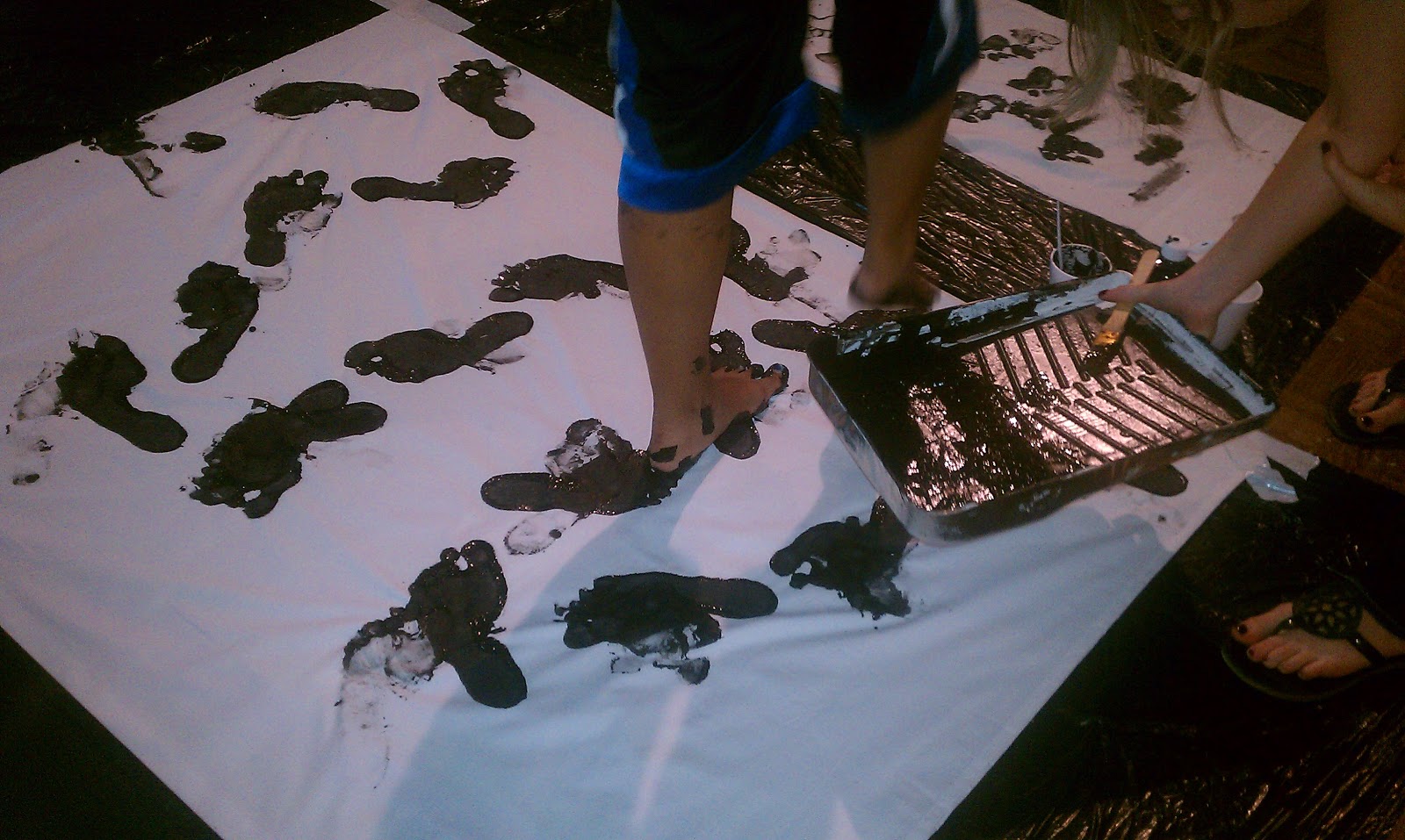
So Alisyn and I spent the better part of last Thursday making our five foot long box. It was definitely not something in our comfort zone. It took us pretty much four hours to make this thing. But I think it turned out well and was completely useful and will be in the future.


Then on Friday we painted this box. Which really wasnt all that bad. I always hear professors say Buick something but never actually do it cause it seems something out of my league. But I'm glad we went ahead and did this.


 And while we were making the box, Nisa (who couldn't get into the woodshop) was working on Erin's code as per our agreement.
Then on Friday we painted this box. Which really wasnt all that bad. I always hear professors say Buick something but never actually do it cause it seems something out of my league. But I'm glad we went ahead and did this.
Tuesday, November 27, 2012
Making music! (now with Processing!)
So we had arduino reading data from the ultrasonic range finder last class, and we hooked it up to a piezo to make tones.
We decided we really did not like the arduino tones, and playing an mp3 file just isn't fast enough to do what we want, so we came up with an idea to hook it up to processing.
Using a cipher library for processing I found, we got processing reading the pwmRange from arduino via serialEvent and then turn it into a tone range for a bunch of piano keys processing writes up itself (meaning no external mp3 files, its all processing.) Now we haven't played around with tweaking the data to get it working correctly with the keys yet, but you can see how its already working in the video.
By using processing, we can also directly record the audio on the computer without any need of microphones or capturing background noise.
Monday, November 19, 2012
final project process
By using 4 ultrasonic rangefinder set a different heights on different walls we plan on tracking people preforming different types of dances and varying movements (curtsey of Nezla being president of the salsa club). We currently have the rangefinder connected to a piezo so it creates different sounds based on the distance of the person in relation to the sensor. We want to record the sounds produced and allow the audience to listen to the soundscapes created from different types of dance. How does the sound created after the dance compare to the sound the dance was created to? what patterns will be created? We have two plans for creating this set up:
the first involving connecting each ardunio to the computer which then records the outputs from the range finder (no piezo) and brings them into processing where we will assign tones for each value and record these tones within the computer so there is no ambient noise recorded and processing allows us more flexibility with the type and variety of tone we want to use versus arduino which had very digital default sounding tone.
The back up plan is to create sound proof boxes which house the piezo and the microphone which will be hooked up to the computer and record into a recording program (audacity, garageband etc.) This would present a higher risk of having ambient noise recorded in the background and would record only the default tones of the arduino.
We also plan on video taping each performance to give a visual representation of the sound
Some challenges we have:
communicating with processing (Nisa will be our guru)
making sure the sound proof box is completely sound proof
making sure the dances have enough variety
possible dance types
salsa
arial dancing
modern
hip hop
Chacha
ballet
swing
The dancers will also be confined to a marked off square based on the limit of the range finders
Presentation ideas:
a video interpretation
a video documentation
set up on 3 separate computers
strictly audio stations labeled
diagraming steps
writing down the steps
train of thought while dancing
other ideas:
monitoring sounds created from foot traffic in different locations
daily routine
the first involving connecting each ardunio to the computer which then records the outputs from the range finder (no piezo) and brings them into processing where we will assign tones for each value and record these tones within the computer so there is no ambient noise recorded and processing allows us more flexibility with the type and variety of tone we want to use versus arduino which had very digital default sounding tone.
The back up plan is to create sound proof boxes which house the piezo and the microphone which will be hooked up to the computer and record into a recording program (audacity, garageband etc.) This would present a higher risk of having ambient noise recorded in the background and would record only the default tones of the arduino.
We also plan on video taping each performance to give a visual representation of the sound
Some challenges we have:
communicating with processing (Nisa will be our guru)
making sure the sound proof box is completely sound proof
making sure the dances have enough variety
possible dance types
salsa
arial dancing
modern
hip hop
Chacha
ballet
swing
The dancers will also be confined to a marked off square based on the limit of the range finders
Presentation ideas:
a video interpretation
a video documentation
set up on 3 separate computers
strictly audio stations labeled
diagraming steps
writing down the steps
train of thought while dancing
other ideas:
monitoring sounds created from foot traffic in different locations
daily routine
Some more Ultrasonic Range Finder tests: Processing Edition
So as seen from the videos Nezla posted, one of the tests we did was hook up the ultrasonic range finder data into the serial port so that Processing could read and process it. To visualize that the data was coming through easily, I simply turned the read (which was coming in at inches) to the diameter of an elipse in processing. The result was the closer you were to the sensor, the smaller the circle. (IE: It did what we wanted it to do.)
Arduino Code: (project 38 modified)
Arduino Code: (project 38 modified)
// Project 38
#define sensorPin 9
long pwmRange, inch, cm;
void setup() {
// Start serial communications
Serial.begin(9600);
pinMode(sensorPin, INPUT);
}
void loop() {
pwmRange = pulseIn(sensorPin, HIGH);
// 147uS per inch according to datasheet
inch = pwmRange / 147;
Serial.println(inch);
}
Processing Code: (an example I do not remember)
import processing.serial.*;
Serial myPort; // The serial port:
//one variable needed for the circle diameter
int circDiameter;
void setup() {
size(400, 300);
println(Serial.list());
// match the port correctly from the printed serial list
myPort = new Serial(this, Serial.list()[0], 9600);
myPort.bufferUntil('\n');
}
void draw() {
background(200);
fill(165, 27, 27);
ellipse(width/2, height/2, (circDiameter*10)-500, (circDiameter*10)-500);
}
void serialEvent(Serial myPort) {
// read String from the serial port:
String inString = myPort.readString();
println(inString);
float tempDiameter = float(inString);
//turn serial info into the circDiameter variable
circDiameter = int( map(tempDiameter, 0, 1023, 30, 250) );
}
Prototype for Final
So, we expanding and kind of have a solid project idea which Alisyn posted about here:
http://sensorbased.blogspot.com/2012/11/final-project-process_19.html
Here's a video of arduino talking to processing:
http://sensorbased.blogspot.com/2012/11/final-project-process_19.html
Here's a video of arduino talking to processing:
This video shows processing reacting more accurately with the arduino's information.
project notes
I. ultrasonic range finder w/piezo
1. measures distance, proximity
A. alarm - too close
i. direct to a specific location with alarm system - sheep
a. artist intention - how to view a work
b. defining a space
I. mapping
B. sound as a unit of measure
2. movement
A. dance
B. gestures - similar to last project (talking with hands)
i. defining a space, personal space
ceiling mesure height
wall measure width
connotation of sounds- high pitch = warning
music vs sound vs noise
painful high pitch- reaction "Make it stop!"
fire alarm
digital sound connotes to technology, robots -R2D2
gallery vs a pubic space
Theremin Video (Process)
This is a video of the actual project working as it should in the book with the numbers:
Sunday, November 18, 2012
Final Project Process
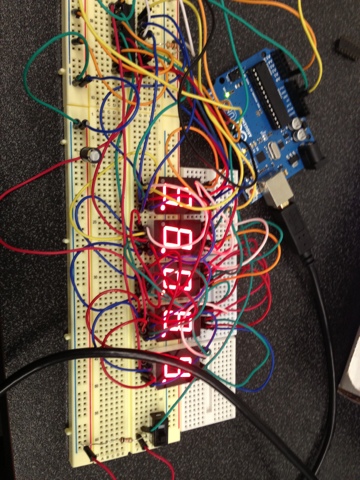
We have gotten our basic technology working!!! We actually found this tutorial in our textbook, project 41! Now, that we've gotten this to work, we can tweak and mess with the code and wiring to get it to do exactly what we want it to do.


Wednesday, November 7, 2012
Tuesday, November 6, 2012
Final Project Proposal
Form
The project will be consist of three “boxes” (the final form has not been decided on yet but will consist of a three-dimensional sculpture that likely opens and closes). This boxes will be placed on the three walls or corners of the room. A theremin structure (or ultrasonic range finder if theremin doesn’t work) will pick up people’s presence as they move in the space triggering a different response from each box, depending on which one of us created that box. Some boxes would essentially reward you for going in to see it, while others will try to steer you away from it.
Concept
There will be three main concepts that we will explore. The first concept will be exploring the idea of an assumptions and how far people will go to satisfy their curiosity. The second concept is more rewarding to the viewer as the box will be making annoying sounds until someone comes into it’s vicinity and it will get quieter and quieter as you get closer. This is more of calling attention and our need to get something to “shut up” when it’s making sounds.
-------------
The concept is to explore three different concepts using the same technology and similar structures. The piece in its entirety would delve into three different metaphors that the viewers can interpret individually, or as a collection. The umbrella theme that encompasses all three of these elements is curiosity.
The first ‘concept’ will be exploring the idea of an assumptions and how far people will go to satisfy their curiosity.
The second ‘concept ‘is more rewarding to the viewer as the box will be making annoying sounds until someone comes into it’s vicinity and it will get quieter and quieter as you get closer. This is more of calling attention and our need to get something to “shut up” when it’s making sounds.
The third ‘concept’ plays with curiosity as a selfish instinct. The box emits a ‘cry’ of protest. (Cry is being used loosely, to not mean a literal “cry” but more shrill sound of protest.) This protesting gets louder the closer the viewer gets to the piece, loudest just as the are about to open the closed “box” in which suddenly it goes silent and a message released makes the viewer realized how they can completely disregard anything to satisfy their curiosity.
Method
This will be done creating a theremin which will be placed on a box which will be placed on the pedestal. The “box’ will either contain a key and lock or something to entice the viewer to come closer.
Materials
Wood
Hinges
Key and Lock/latch system
Sensors: ultrasonic ranger finder
arduino (x3)
theremin materials
Inspiration
http://hacknmod.com/hack/create-techno-with-a-laser-harp/
http://vimeo.com/2885437
http://aprb.co.uk/projects/all-projects/2012/simon-faithfull--shy-fountain
Monday, November 5, 2012
Sunday, November 4, 2012
Project 34 and 35 Touch Screens
Here is our attempt at doing project 34. If I remember correctly we couldn't get this one to work in class either:
And here is project 35 which made us happier cause it actually worked!
And here is project 35 which made us happier cause it actually worked!
Subscribe to:
Posts (Atom)